

OPC UA in WinScript Live
Alcorn McBride show controllers are renowned for their ability to integrate with many of the common systems used to build cutting-edge attractions. Modbus, EtherNet/IP, TCP, UDP, serial, digital IO — these are the protocols and interfaces that keep attractions running, and they’ve served the industry well for decades.
OPC UA is the latest addition to our ecosystem and it’s built directly into WinScript Live, starting with 6.10.0, and our show controllers. No additional hardware, no licensing, no extra software.
What makes OPC UA unique is its elegant subscription model. Instead of inefficiently polling our show controllers for variable values, any OPC UA client can access a directory of named variables and subscribe to the ones it needs. When one of those values changes, the show controller immediately pushes the new value to the client with very minimal network traffic. This makes it snappy and efficient without requiring any extra show control scripting to implement.
In attraction environments, one of the most powerful applications for OPC UA is monitoring variable data from third-party controllers, SCADA, and HMI software packages.. Since it is a widely used industry standard protocol, this offers a ton of flexibility with integrating Alcorn McBride show controllers into just about any monitoring system architecture.
OPC UA IN PRACTICE
To enable the OPC UA server within WinScript Live, go to Configuration → Script → OPC UA in and check ‘Enable OPC UA Server’. Configure the server options as needed, then upload the script to the controller and apply the new configuration.
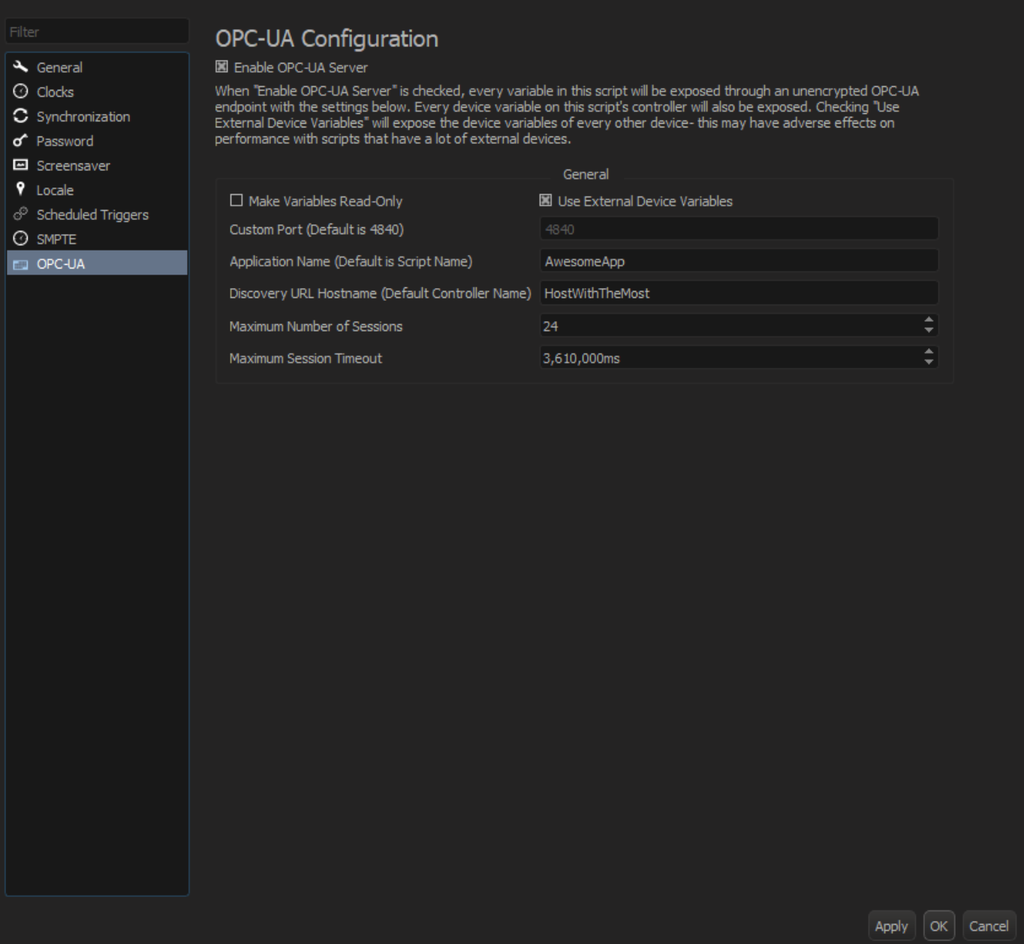
Once active, the OPC UA interface will begin publishing all of the Show variables within the show control script to all of the show controllers network interfaces using port 4840 by default. In addition to Show variables, Device variables can also be exposed when the ‘Use External Devices’ option is enabled.
Say a V16X has a user-defined Show variable called strRideStatus. That variable will appear to the OPC UA client within the Show variables container like this:
Namespace: 1
Identifier type: String
Identifier: strRideStatus
If the client subscribes to strRideStatus, it receives updated values whenever this string is modified. OPC UA settings such as sampling and publishing intervals can be adjusted to limit updates based on necessity to conserve processor utilization and network bandwidth. For example, in the event that strRideStatus is being updated every frame at 60fps (17ms) within the show controller, you can configure the OPC client to only receive updates once per second if that’s sufficient for your monitoring needs.
Variables published via OPC UA are read/write by default. When configuring OPC UA within WinScript Live, you have the option to enable ‘Make Variables Read-Only’ to prevent clients from writing to published variables. PLC’s can also write to the V16X with the same auto-publish methodology as it can be bi-directional.
The client can subscribe to a large number of variables, with practical performance depending on the sampling interval and application. This makes it easy to exchange information like projector status, playback state, show states, faults, and more for attraction-level, facility-wide, or park-wide monitoring.
Since OPC UA is frequently used for implementing HMI (Human Machine Interface) panels, this is also an elegant solution for creating custom touch panel solutions that integrate with our show controllers cleanly using this industry standard protocol.
OPC UA support requires WinScript Live V6.10.0 or later.
SUPPORTED PRODUCTS
— V16X
— V4X
— RidePlayer
— RidePlayerX
— BinloopX
SUPPORTED CLIENTS
OPC UA clients that support unencrypted OPC UA servers will integrate with our show controllers. Some popular examples include:
-Ignition
-Siemens SIMATIC WinCC
-Open Automation Software
-TwinCAT HMI Server
For complete documentation including setup steps, configuration details, and the full variable type reference, visit docs.alcorn.com
Works Together. Runs Forever.

